- Version
- 0.6.0
- Depends
- R (>= 4.0)
- Imports
- targets, dplyr, purrr, roxygen2, Rd2md, jsonlite, rlang, withr
- License
- MIT + file LICENSE
- Links
- cathalbyrnegit.github.io
Browse source code
Report a bug - Author
- Cathal Byrne [aut, cre]


Auto-generate documentation for any targets pipeline. Point tardoc at your project and get structured markdown, a browsable HTML viewer, and — optionally — a full analytics stack with SQL queries, semantic search and an LLM chat interface.
# install.packages("remotes")
remotes::install_github("CathalByrneGit/tardoc")

tardoc::document_targets(pkg_name = "My pipeline")
tardoc::view_tardoc()
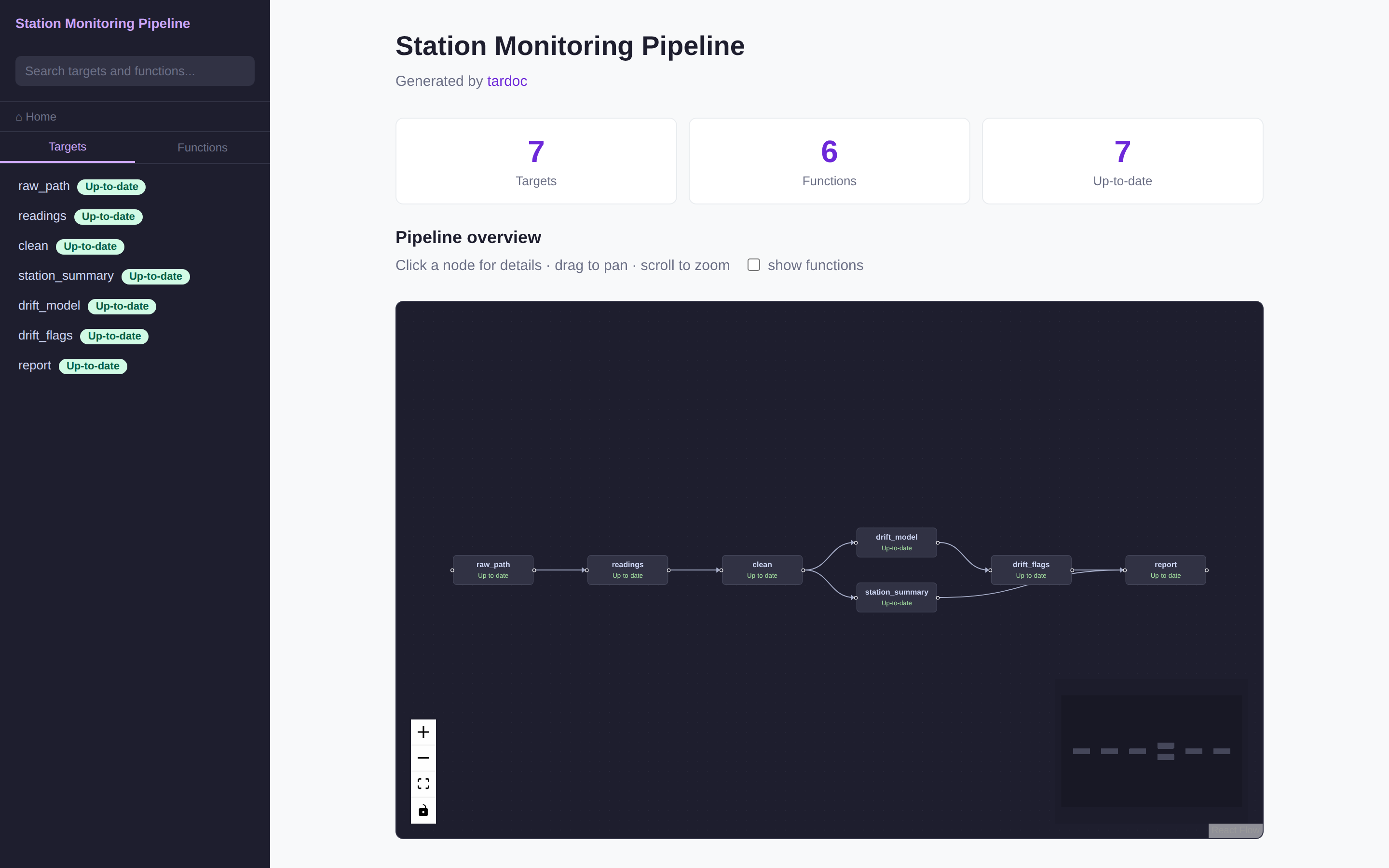
Nothing in that screenshot is hand-written: every page, badge and graph comes
from _targets.R and the roxygen comments in R/. It is the example pipeline in
inst/examples/station-monitoring, published
on every push — open the
live demo.
1 What you get
document_targets() writes one .md per target and per function, plus two
self-contained HTML files that open as file:// — no server, no R on the
reader’s side:
- The viewer. An interactive React Flow graph of the pipeline, a sidebar that stays usable at several hundred targets, fuzzy search, and a page per target and per function carrying status, timings, sizes, errors, per-branch detail, the critical path, a diff against the previous build, and function source with its comments intact.
- Freshness, not just errors. Every target reads
Up-to-date,Outdated,ErroredorNot built, so a target invalidated by an upstream change is visible before you run anything. - A WASM analytics page. DuckDB in the browser: SQL, dplyr syntax, BM25 search and recursive lineage queries over the pipeline.
llms.txtat the project root, for pasting a pipeline into an LLM conversation.
Three optional layers go further: a live DuckDB server with semantic search, an LLM chat tab, and the pipeline database as an MCP server for Claude Desktop and Claude Code.
A store does not have to exist. tar_manifest() and tar_network() read
_targets.R alone, so a pipeline that has never been run documents fully — with
every target reading Not built, which is accurate rather than a gap.
2 Documentation
Full documentation is at cathalbyrnegit.github.io/tardoc:
- Get started — install, what gets written, and whether you need a store
- The viewer — every page of it, and how the sidebar and graph behave at 420 targets
- Selector guide — filter
the graph the way you would in dbt:
clean+,+report,ingest_* - Analytics, chat and MCP — SQL, semantic search, the chat tab, the MCP server
- Publishing — regenerating the docs in CI so they cannot drift
- Manual — every exported function
- Examples — three worked examples, run when the site is built: documenting a pipeline from scratch, reading a run’s critical path, and finding a pipeline’s groups
- Design notes — why the graph is React Flow, how Quack remote access works, and what it would take to publish a whole targets project to the browser
3 Licence
MIT. See LICENSE.
Appendix
To cite the package tardoc in publications, please use:
Byrne C (2026). tardoc: Generate Documentation and Analytics for targets Pipelines. R package version 0.6.0, https://cathalbyrnegit.github.io/tardoc/.
@Manual{,
  title = {tardoc: Generate Documentation and Analytics for targets Pipelines},
  author = {Cathal Byrne},
  year = {2026},
  note = {R package version 0.6.0},
  url = {https://cathalbyrnegit.github.io/tardoc/},
}