1 React Flow pipeline graph
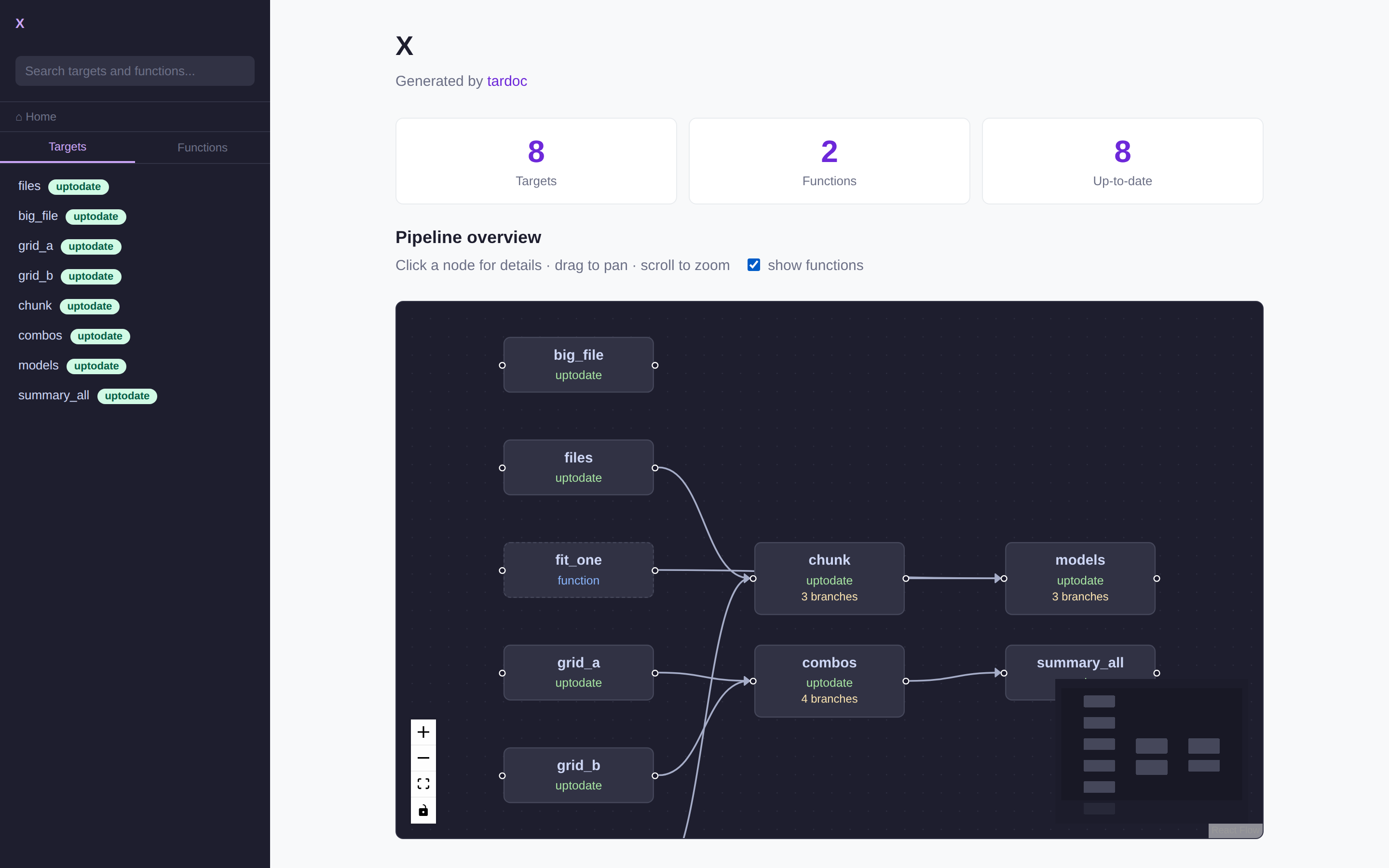
The pipeline overview in viewer.html is now rendered with
React Flow instead of mermaid. Clicking a target opens
a detail panel; the standalone generate_reactflow_graph() page remains for a
full-screen view.
Borrowed from dplyneage, which renders column-level lineage the same way.
1.1 Why replace mermaid
| Asset | Size |
|---|---|
mermaid@11.17.2 |
3,488.9 KB |
reactflow@11.11.4 UMD |
151.6 KB |
react-dom@18.3.1 UMD |
128.7 KB |
react@18.3.1 UMD |
10.5 KB |
React Flow style.css |
9.0 KB |
| React Flow total | 299.8 KB |
11.6× smaller, and genuinely interactive: drag nodes, pan, zoom, minimap, per-node status colouring.
mermaid is no longer loaded at all. The per-target pages still carry a
mermaid fence, so the generated .md files render on GitHub and anywhere
else markdown is read — that portability was worth keeping. The viewer ignores
the fence’s contents and replaces it with a React Flow graph built from the same
data:
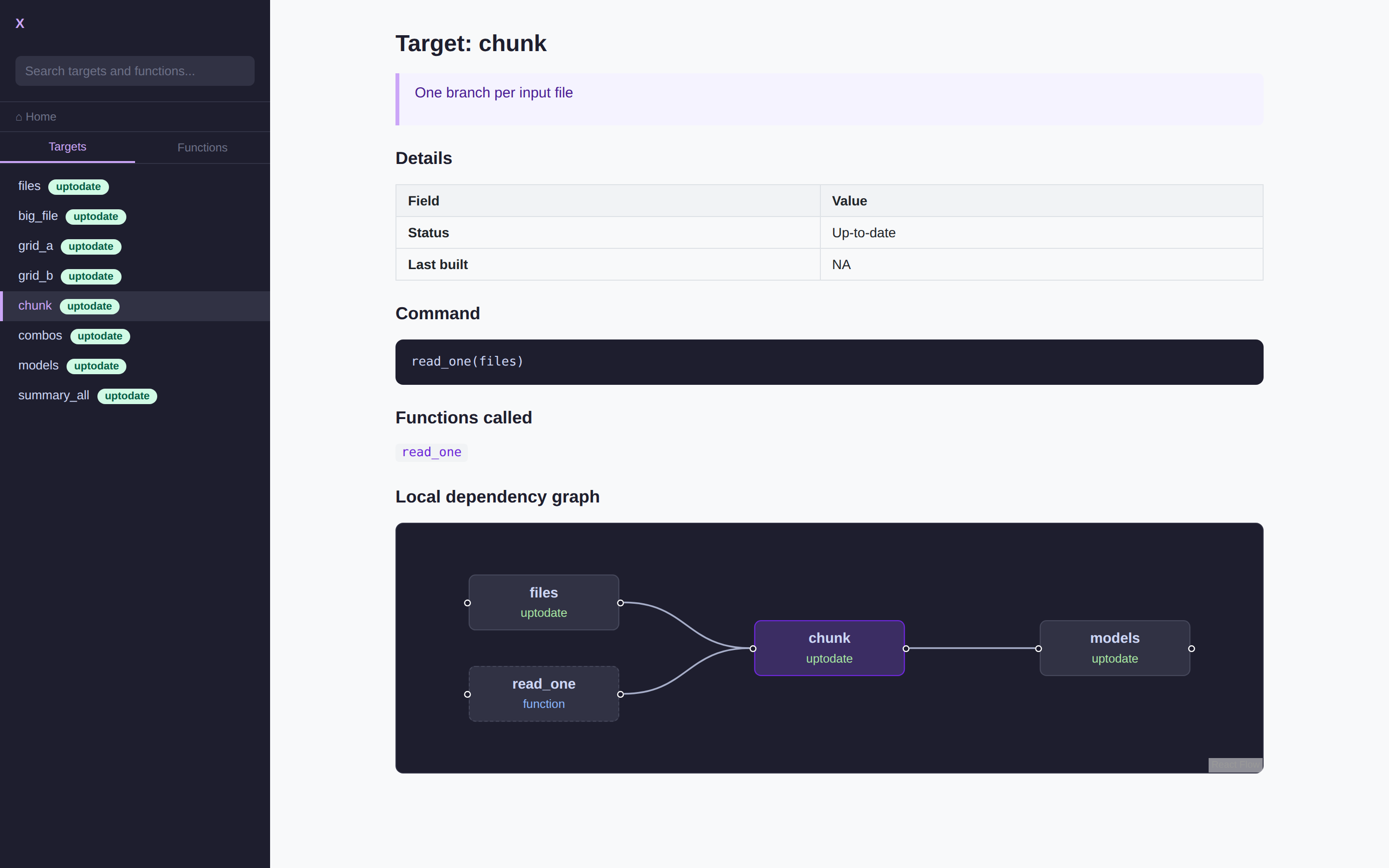
So the full 3,488.9 KB is reclaimed, and the .md files lose nothing.
1.2 What a node shows
Node bodies carry name, status, and a branch count when the target is branched. Clicking opens a panel with:
- description and the R command
- Branching — the
patternexpression, e.g.map(files)orcross(grid_a, grid_b) - error and warnings, when present
- Details — format, repository, iteration, last built, runtime, size
- Depends on / Feeds into as clickable chips that move the panel to that neighbour
- Open full page →, which navigates the viewer to that target
Defaults are hidden. repository: local and iteration: vector are true of
almost every target and would be noise on every panel, so they only appear when
they differ.
1.2.1 Where the branching fields come from
Checked against a real branched pipeline rather than assumed. tar_manifest()
carries pattern, format, repository, iteration, memory, storage,
retrieval, deployment, priority, cue_* and packages; tar_meta()
carries type, parent, children, bytes, seconds, warnings, error.
One trap worth recording. meta$children is not a branching signal.
targets records branch names against a plain stem that a downstream pattern maps
over, so a grid_a stem shows two children despite not being branched itself.
The honest signal is manifest$pattern — the target’s own declaration, and
available even with no store. meta$type == "pattern" confirms it at runtime,
and only then is children a branch count. There is a test pinning exactly this.
1.3 The cost
React Flow does no layout. Every node must arrive with an (x, y).
dag_layout() assigns a column by longest-path depth from a root, stacks nodes
within a column, and centres each column against the tallest — ~40 lines, the
same approach dplyneage uses in layout_positions().
1.4 Deep links
viewer.html now reads and writes a location hash: viewer.html#targets:clean
opens that target directly, and selecting a page records it. The first time a
tardoc page has been linkable.
1.5 Use React Flow v11, not v12
The v12 UMD’s browser branch expects a jsxRuntime global:
t((e=globalThis).ReactFlow={}, e.jsxRuntime, e.React, e.ReactDOM)
React 18’s UMD does not expose one, so v12 needs a shim or a bundler. v11 asks
only for React and ReactDOM. That is also why dplyneage ships its own 347 KB
webpack bundle with React rolled in; tardoc does not need to.
1.6 Function vertices
tar_network() returns the functions each target calls as vertices in their own
right, and they are now drawn — dashed border, blue label — behind a show
functions checkbox on the overview. Hidden by default: on a large pipeline
they roughly double the node count, and the targets are usually what a reader is
after. Clicking one opens its function page.
build_dag_graph(include_functions = FALSE) drops them server-side, and drops
any edge that referenced them.
1.7 Where the node data comes from
tar_network()’s vertices turned out to be a better source than joining the
manifest and metadata by hand: they already carry type (stem / pattern /
function), a branch count, runtime and size. The manifest supplies the command,
branching pattern and storage settings; the metadata supplies errors, warnings
and build time.
Verified against a store-less pipeline: tar_network() still reports vertex
type, so branching is known without a store, but branches, seconds and
bytes come back NA because those live in the store. There is a test for it.
1.8 Not done
- The overview lays out functions with the same layered algorithm as targets, which spreads them across columns. Pinning each function next to the target it feeds would read better.
1.9 Reproducing
setwd(system.file("examples/station-monitoring", package = "tardoc"))
targets::tar_make()
tardoc::document_targets(pkg_name = "Station Monitoring Pipeline")
tardoc::view_tardoc()
Covered by tests/testthat/test-dag_layout.R, including a branched fixture and
a guard that the viewer keeps its navigation functions — an earlier edit deleted
them when the React Flow block was inserted with the wrong boundary.